Every Pull Request,
One Dashboard
PR Radar is a free, open-source Chrome extension that consolidates all your open pull requests across GitHub, GitLab, and Bitbucket into a single toolbar dashboard. Track CI status, reviews, comments, and deployments — without switching tabs.
Last updated on 17th April 2026
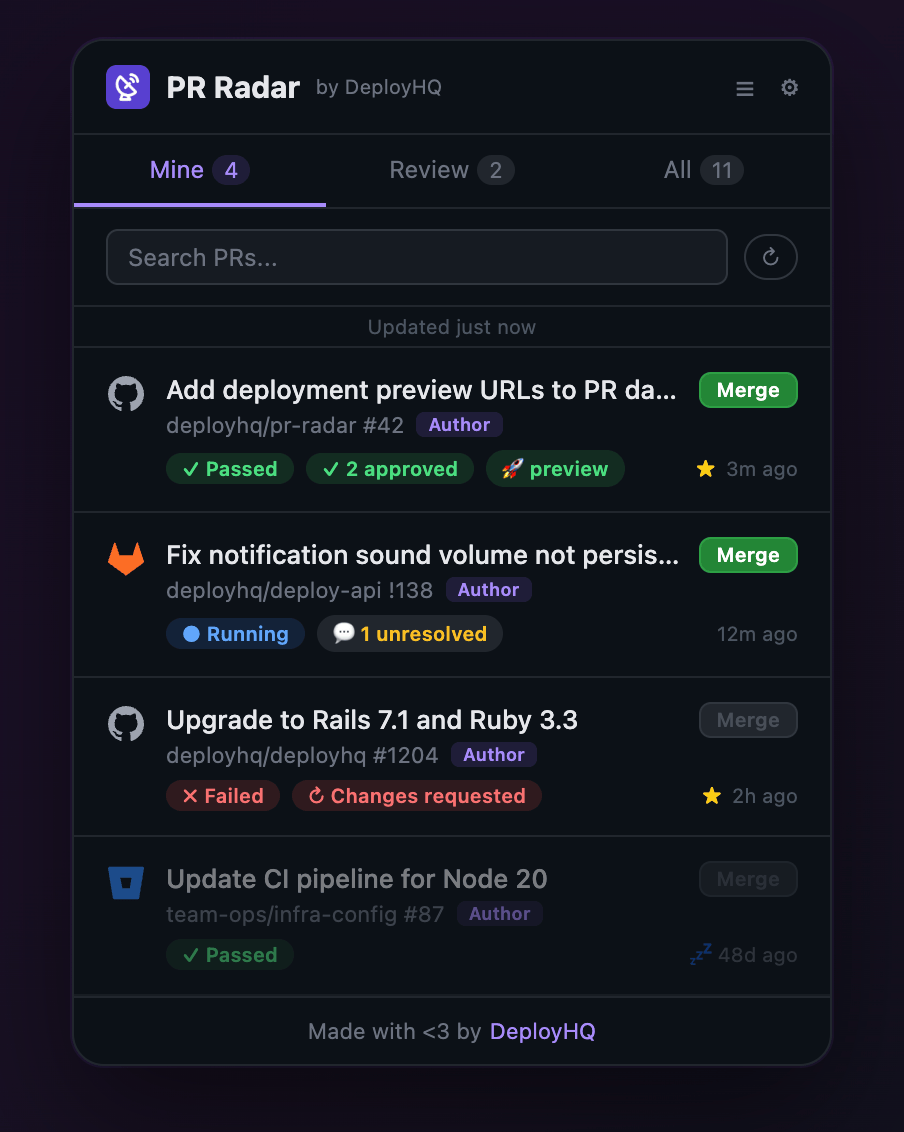
PR Radar by DeployHQ is a free Chrome browser extension that brings all your open pull requests from GitHub, GitLab, and Bitbucket into a unified toolbar dashboard. It monitors CI pipelines, tracks unresolved review comments, surfaces stale PRs, detects merge conflicts, and sends desktop notifications on status changes — all without any backend server, analytics tracking, or data collection. Your tokens stay in local storage and never leave your browser.
From PR Chaos to Clarity
Scattered pull requests across repos lead to missed reviews and broken builds. PR Radar puts everything in one place.
How It Works
Three steps to PR clarity.

Install the Extension
Download from GitHub releases, load as an unpacked extension in Chrome. It's free and takes seconds.

Connect Your Platform
Choose GitHub, GitLab, or Bitbucket and enter a personal access token. It stays in your browser's local storage — never sent to any server.

Monitor Everything
PR Radar polls in the background (30s to 5m). See CI status, reviews, deployments, and merge conflicts from your toolbar badge.
What PR Radar Tracks
A complete picture of your pull request workflow.

CI Status at a Glance
Toolbar badge shows pass, fail, and running counts. Click to see which PRs need attention.

Review & Merge
Know which PRs need your review, track approvals, and merge directly from the dashboard with a confirm step. Works across all platforms.

Comment Tracking
Track unresolved comment threads across all PRs. Surface conversations that need your attention.

Deployment Visibility
See deployment status with clickable environment URLs. Know what's deployed where.

Stale PRs, Pins & Conflicts
Dim stale PRs by configurable thresholds, pin favourite repos to the top, and see merge conflict warnings before you merge.

Desktop Notifications
Get desktop and sound alerts when CI status changes. Choose from Ding, Bell, or Chime sounds.

Privacy First
No backend. No analytics. No data collection. Your access tokens stay in local storage and never leave your browser.

Background Polling
Works without any tab open. Configurable polling intervals from 30 seconds to 5 minutes with instant cached display.
Start tracking PRs in under a minute

Install the Extension
Download from GitHub releases and load as an unpacked extension — it's completely free, no account required.
Connect Your Platform
Choose GitHub, GitLab, or Bitbucket and create a personal access token. Required scopes are listed in the setup form.
Select Repos & Go
Pick the repos you want to monitor, pin your favourites, and PR Radar starts tracking immediately.
Frequently Asked Questions
What is PR Radar?
PR Radar is a free, open-source Chrome browser extension by DeployHQ that consolidates all open pull requests across your GitHub, GitLab, and Bitbucket repositories into a single toolbar dashboard. It tracks CI status, code reviews, comments, deployments, merge conflicts, and stale PRs.
Is PR Radar really free?
Yes. PR Radar is completely free and open source under the MIT license. There are no paid tiers, no usage limits, and no hidden costs. It's a standalone tool — you don't need a DeployHQ account to use it.
Does PR Radar collect any data?
No. PR Radar is privacy-first by design. Your personal access tokens are stored in Chrome's local storage and never sent to any backend server. All API calls go directly from your browser to the platform APIs. There is no analytics, no tracking, and no data collection of any kind.
Which Git platforms does PR Radar support?
PR Radar supports GitHub, GitLab, and Bitbucket. You can connect multiple platforms simultaneously and see all your PRs in one unified dashboard.
Can I merge PRs from the dashboard?
Yes. PR Radar lets you merge pull requests directly from the popup with a confirm step. This works across all supported platforms — GitHub, GitLab, and Bitbucket.
Do I need a DeployHQ account to use PR Radar?
No. PR Radar is an independent tool that only needs a personal access token for your Git platform. However, if you deploy code, DeployHQ pairs perfectly with PR Radar — you can see deployment status directly in your PR dashboard.
How often does PR Radar check for updates?
PR Radar polls your platform APIs in the background at configurable intervals — 30 seconds, 1 minute, 2 minutes, or 5 minutes. It works without any tab open and sends desktop notifications when CI status changes.
Ready to take control of your pull requests?
Install PR Radar free, or pair it with DeployHQ for full deployment visibility.
PR Radar is free forever. DeployHQ offers a 10-day free trial for deployment automation.
Explore More Features
Discover all the tools that make DeployHQ the easiest way to deploy your code.