
Choosing a Git branching strategy is one of those decisions that quietly shapes how a team ships software for years. Pick the wrong one and you end up with three-day merge wars, broken main branches, and release managers who never sleep. Pick the right one and deployments stop being a ceremony.
This guide walks through the five branching strategies most teams actually use in 2026 — GitHub Flow, GitFlow, GitLab Flow, Trunk-Based Development, and Release Flow — with the workflow, real-world fit, and the trade-offs that vendor blog posts usually leave out. Each section includes how the strategy maps onto a modern deployment pipeline so you can match the workflow to the way your team already releases code.
How to choose: the 4 questions that decide your strategy
Before reading the strategy descriptions, answer these four questions. Your answers narrow the field from five strategies to one or two.
- Release cadence. Do you deploy multiple times a day, weekly on a schedule, or in versioned releases (v3.1, v3.2)?
- Team size and seniority. Five senior engineers behave very differently from forty mid-level engineers across three time zones.
- Number of production versions supported. Is there one production version, or do enterprise customers run v2 while v4 is in beta?
- Tolerance for branch lifetime. Are short-lived branches (hours to days) realistic given your review and CI cycle, or do features routinely need weeks?
Long-lived branches are where branching strategies usually fail. The longer a branch lives, the higher the merge cost — and the more likely the team starts working around the process instead of with it.
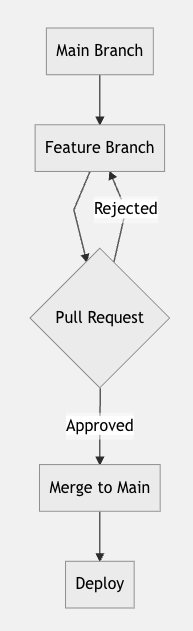
1. GitHub Flow
graph TD
    A[Main Branch] --> B[Feature Branch]
    B --> C{Pull Request}
    C -->|Approved| D[Merge to Main]
    C -->|Rejected| B
    D --> E[Deploy]
Workflow:
- Create a feature branch from
main - Develop and commit changes
- Open a pull request
- Review and discuss
- Merge to
main - Deploy
Best for: Small teams, web applications, and any project running continuous delivery where there is exactly one production version live at a time.
What people miss: GitHub Flow assumes main is always deployable. That only holds if your CI runs the full test suite on every PR and your team treats a red main as a stop-the-line event. Without that discipline, GitHub Flow quietly becomes merge to main and hope
. Pair it with required status checks, branch protection rules, and a deployment system that triggers on every merge — for example, DeployHQ's automatic deployment from Git running against a protected main.
Trade-off: No staging branch means staging environments are a deploy target, not a branch. Some teams find that liberating; others miss the buffer.
2. GitFlow
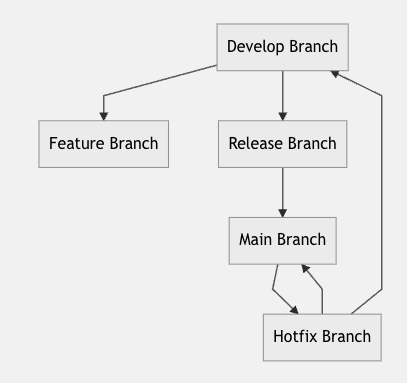
graph TD
    A[Develop Branch] --> B[Feature Branch]
    A --> C[Release Branch]
    C --> D[Main Branch]
    D --> E[Hotfix Branch]
    E --> D
    E --> A
Workflow:
- Develop features in feature branches off
develop - Merge features back into
develop - Create a release branch from
developwhen cutting a version - Stabilise the release branch with bug fixes
- Merge the release branch into both
mainanddevelop - Use hotfix branches off
mainfor urgent production fixes
Best for: Versioned products with scheduled releases — desktop apps, mobile apps with app-store review cycles, SDKs, packaged enterprise software.
What people miss: GitFlow's original author Vincent Driessen added a note in 2020 suggesting teams should not use GitFlow if they ship continuously — he was explicit that the model was designed for software with multiple versions in production, not web apps deploying many times a day. A lot of teams adopted GitFlow during the 2010s by default and then spent years wondering why their merges were so painful. If you have one production version and deploy daily, you almost certainly want GitHub Flow or trunk-based development instead.
Trade-off: Two long-lived branches (main and develop) plus release and hotfix branches means more ceremony per change. The pay-off is clean version separation for products that genuinely need it.
3. GitLab Flow
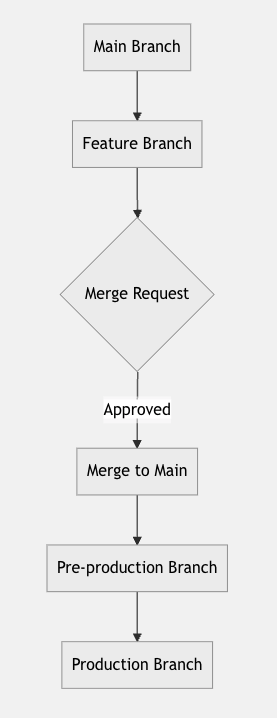
graph TD
    A[Main Branch] --> B[Feature Branch]
    B --> C{Merge Request}
    C -->|Approved| D[Merge to Main]
    D --> E[Pre-production Branch]
    E --> F[Production Branch]
Workflow:
- Create a feature branch from
main - Develop and commit changes
- Open a merge request
- Review and merge to
main - Promote
mainto a pre-production branch - Promote pre-production to a production branch
Best for: Teams that want GitHub Flow's simplicity but also need explicit promotion gates between environments — typically organisations with a dedicated QA or release-management function.
What people miss: GitLab Flow's environment branches
are a deployment mechanism, not a development mechanism. Feature work still happens in short-lived branches off main. The promotion branches exist so that what's running in production can be expressed as a Git ref — useful for audit, rollback, and reconstructing exactly what shipped on a given date. If you already use a deployment tool that tracks revisions per environment, environment branches add overhead without adding much value. If you don't, they're a lightweight way to get there.
Trade-off: Promotion branches drift if no one is disciplined about merging forward. A pre-production branch that hasn't been updated in two weeks is worse than no pre-production branch at all.
4. Trunk-Based Development
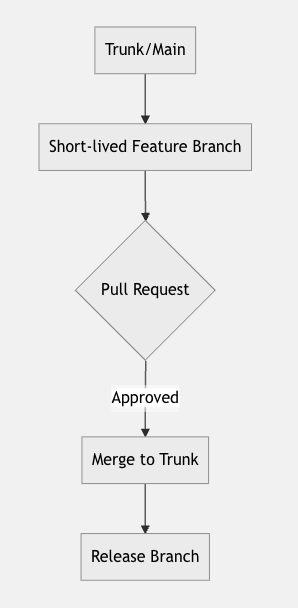
graph TD
    A[Trunk/Main] --> B[Short-lived Feature Branch]
    B --> C{Pull Request}
    C -->|Approved| D[Merge to Trunk]
    D --> E[Release Branch]
Workflow:
- Work directly on trunk or short-lived feature branches (hours to a couple of days, not weeks)
- Integrate changes back to trunk multiple times a day
- Use feature flags to keep incomplete work out of production
- Cut release branches from trunk when you need to ship a versioned build
Best for: Teams practising continuous integration in the strict DORA sense — every developer integrates to trunk at least daily. Common at high-throughput product organisations and any team that has invested in feature-flag tooling.
What people miss: Trunk-based development is not just small branches
. It's a feature-flag discipline. You merge incomplete code to trunk, hidden behind a flag, and gradually roll it out — which means your codebase has to tolerate dead code paths, your QA process has to test flag combinations, and your deployment system has to support fast rollbacks if a flag misbehaves. DORA's research on elite performers consistently shows trunk-based development correlates with high deployment frequency and low change-failure rate — but only when paired with strong CI, fast tests, and the cultural norm that breaking trunk is an immediate-fix event.
Trade-off: The investment in feature flags and CI infrastructure is real. For a team of three shipping a marketing site, it's overkill. For a team of fifty shipping a SaaS product ten times a day, it's the only thing that scales.
5. Release Flow
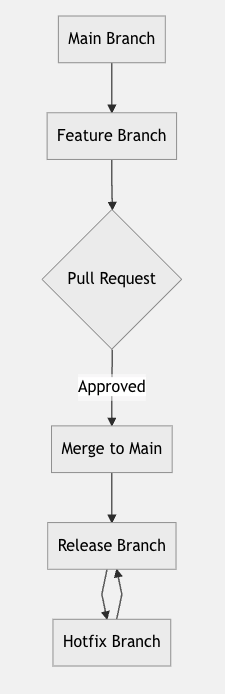
graph TD
    A[Main Branch] --> B[Feature Branch]
    B --> C{Pull Request}
    C -->|Approved| D[Merge to Main]
    D --> E[Release Branch]
    E --> F[Hotfix Branch]
    F --> E
Workflow:
- Create feature branches from
main - Develop and open pull requests
- Merge features to
main - Cut a release branch when you decide to ship
- Apply hotfixes directly to the release branch and cherry-pick back to
main
Best for: Large-scale products that support multiple versions in production — typical of platform teams, infrastructure software, and enterprise SaaS with long-term support tiers. Microsoft documented this pattern internally as Release Flow for Azure DevOps (formerly VSTS
), where they shipped multiple supported versions while still merging continuously to main.
What people miss: Release Flow is GitFlow with one big change — there's no develop branch. main plays both roles. That sounds minor, but it eliminates the most painful part of GitFlow (the perpetual main ↔ develop reconciliation) while keeping the part that's actually useful (release branches you can patch independently).
Trade-off: Cherry-picking hotfixes from release branches back to main is error-prone if you don't have good tooling. Tag every release commit and use git cherry-pick -x so the original SHA is recorded in the commit message.
Quick comparison
| Strategy | Long-lived branches | Best fit | Where it breaks |
|---|---|---|---|
| GitHub Flow | main only |
Web apps, continuous delivery, small teams | If main isn't truly always-deployable |
| GitFlow | main + develop |
Versioned products, scheduled releases | Continuous delivery, web apps |
| GitLab Flow | main + environment branches |
Teams needing explicit promotion gates | Drifts without strict merge-forward discipline |
| Trunk-Based | trunk only | High-throughput teams with feature flags | Without feature flags or strong CI |
| Release Flow | main + per-release branches |
Multiple supported production versions | Without cherry-pick discipline |
Tired of writing the glue between merge and production? DeployHQ takes any of these branching strategies and turns the merge into an audited deploy — see what that looks like in the build pipeline walkthrough, or jump straight to DeployHQ pricing if you've seen enough.
Pitfalls that bite every branching strategy
The five strategies above all assume a few things that aren't guaranteed. These are the gotchas worth designing around regardless of which model you pick.
- The
always-green main
myth. If your test suite is slow or flaky, developers learn to ignore failures. By the time someone tries to ship,mainhas been broken for hours. Branch protection rules + required status checks are non-negotiable. - Long-lived feature branches. A branch open for three weeks doesn't merge — it collides. Most teams underestimate how quickly merge cost compounds. If a branch can't be merged within a few days, split the work or use a feature flag.
- Releases without rollback. Every strategy assumes you can undo a release. If your only rollback path is
deploy the previous tag and pray
, you don't actually have a release strategy — you have a release wish. A one-click rollback tied to the previous deployment revision turns rollback from an incident into a Tuesday. - Mixing strategies on the same repo. Half the team treating it like GitHub Flow while the other half treats it like GitFlow produces the worst of both worlds. Pick one, document it, and review the choice every six months.
- Confusing the branching model with the deployment model. Your branching strategy decides how code gets into
main. Your deployment strategy decides what happens after. The two are related but separate — and conflating them is how teams end up with elaborate branching schemes papering over a missing build pipeline.
Matching a strategy to your deployment pipeline
A branching strategy isn't useful in isolation — it has to feed something. Here's how each pattern typically maps onto a deployment system:
- GitHub Flow / Trunk-Based: every merge to
maintriggers a deploy. The deployment pipeline does the heavy lifting (build, test, deploy, post-deploy checks) — usually orchestrated through a deployment script that the deployment system runs on each release. - GitFlow: deploys are cut from the release branch, not
main. You'll typically tag the release commit and configure the deployment system to ship that tag to production. Hotfixes deploy from the hotfix branch directly. - GitLab Flow: each environment branch maps to an environment. Merging into the pre-production branch deploys to staging; merging forward to the production branch deploys to production. Promotion happens through Git.
- Release Flow: similar to GitFlow's deployment model, but with cleaner mainline integration. Production deploys from release branches; hotfixes deploy from the same release branches they were cherry-picked into.
Whichever strategy you pick, the deployment side benefits from the same things: automated builds, the ability to deploy from any branch or commit, environment-specific configuration, and atomic zero-downtime deployments so users don't see broken intermediate states. If you're connecting one of these workflows to a server you control, deploy from GitHub to your server or deploy from GitLab takes most of that infrastructure off your team's plate.
What's changing in 2026
A few things worth watching as you settle on a strategy:
- Git 3.0 on the horizon. SHA-256 object hashes, reftable, and other long-anticipated changes will land in major Git releases over the next 12-18 months. None will force a branching-strategy change, but they will affect tooling. See our Git 3.0 overview for the practical implications.
- AI coding agents on long-lived branches. Teams running agentic CI/CD workflows — Copilot Coding Agent, Cursor agents, autonomous bots — are generating PRs at a rate human reviewers can't sustain. Trunk-based and GitHub Flow handle this well; GitFlow's review ceremony becomes the bottleneck.
- Compliance pressure. SOC 2 and similar frameworks increasingly want evidence that every production change went through code review. Whichever branching strategy you choose, the audit trail matters — see SOC 2 compliance for deployment workflows for what auditors actually check.
Choosing one and moving on
There is no universally best Git branching strategy — there is only the best strategy for your release cadence, team size, and tolerance for branch lifetime. Most teams over-think this decision. Pick the simplest model that fits your situation, document it in a one-page README in your repo, and revisit it once a year.
Once the branching model is settled, the next bottleneck is almost always the path from merge to production. That's where automation pays off — and where DeployHQ slots in regardless of which branching strategy you've picked. Start a free DeployHQ project and connect your repo in under five minutes.
Questions, war stories, or want to argue about GitFlow? Reach out at support@deployhq.com or find us on X/Twitter @deployhq.
Note: diagrams were generated with Mermaid.