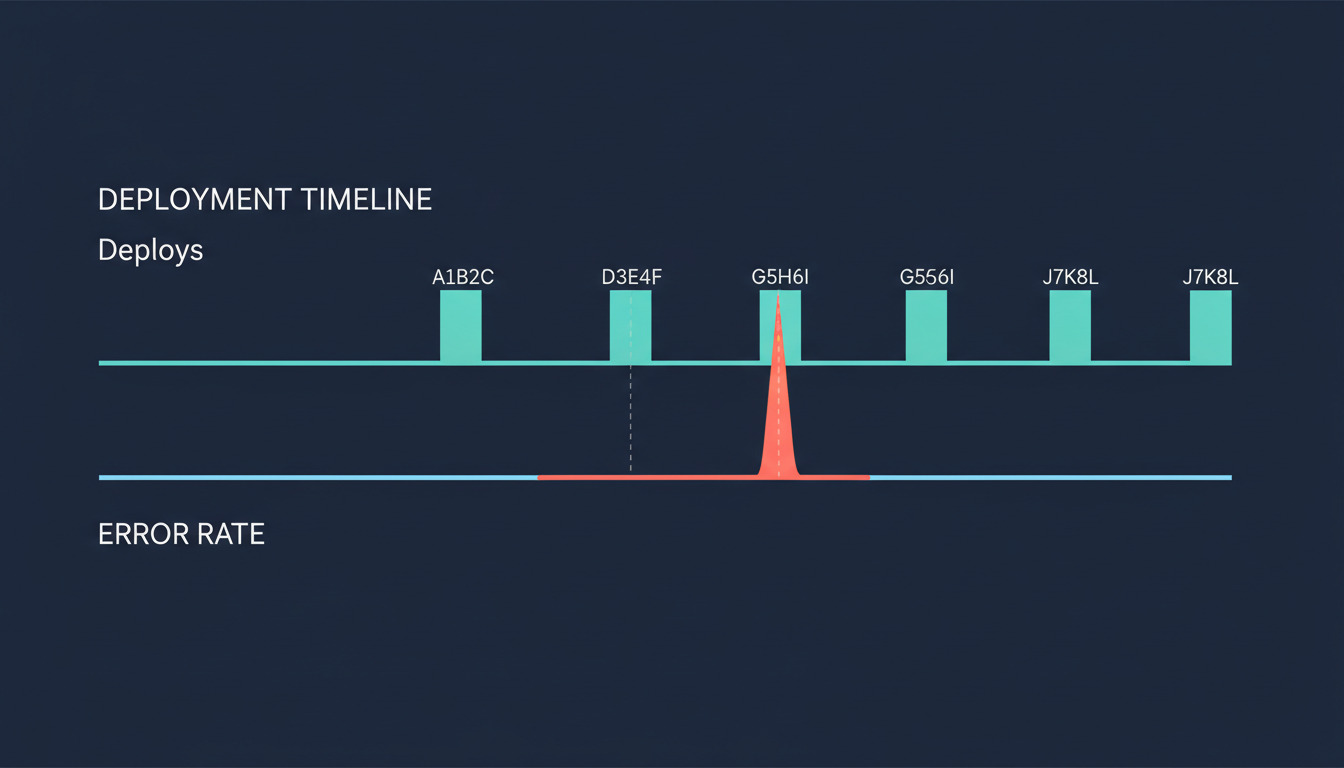
The 2 AM problem: errors without deploy context
It's 2 AM. Honeybadger alerts you to a 5x spike in production errors on your app. You log in groggy. The team shipped six deploys today.
Which one broke it?
You open the deploy log in DeployHQ. You squint at timestamps. You cross-reference SHAs against the error stack traces. Maybe you guess. Maybe you roll back the wrong deploy. The next morning, the team has to reconstruct what actually changed and the on-call has a coffee, not a story.
This isn't a failure of either product. Honeybadger helps you debug production fast, and it does so beautifully in isolation. But without deploy context, even the best error data lacks a critical piece of the puzzle: which deploy introduced the bug.
DeployHQ closes that gap. Every deploy you ship gets pushed to Honeybadger as a tagged event with its commit SHA. From then on, Honeybadger doesn't just tell you something broke — it tells you what shipped, when, and by whom.
The cost of not wiring this up compounds. Longer MTTR. Blame games. And the cultural drift where deploys quietly become scary events that get pushed to Tuesday afternoon to be safe.
If you've ever stalled a release on a Friday because the team was too tired to handle a regression, you've felt this gap.
The fix is straightforward: tell each system about the other. Once you do, your next 2 AM page comes with a name attached — not something broke,
but a specific deploy, on a specific server, by a specific person.
For more on the broader principle, read our take on what you should be tracking on every deploy.
The deploy → error link in plain terms
Two views of the same event, one shared key.
In Honeybadger, a deploy is recorded as a tagged event in time, attached to a specific commit SHA. When errors come in, Honeybadger attributes each one to the deploy that was live when it happened. New errors that appear right after a deploy are the ones you care about most.
In DeployHQ, a deploy is the act of building that commit and pushing it to a specific environment. Each deploy has a SHA, an environment (production, staging), and a timestamp.
The join key is the commit SHA. Not timestamps — clock drift between systems will burn you. Not deploy IDs — those are internal to each tool. Just the SHA. If both systems know the SHA of the code that's running, they can answer which deploy introduced this error?
without anyone guessing.
This is also why this kind of integration matters more once you're shipping continuously. Honeybadger is built for teams supporting apps in production and shipping often, and tying errors back to the deploy that introduced them is critical. With a deploy a week, you can hold all six SHAs in your head. With six a day, you can't — and you shouldn't have to. See our primer on modern continuous deployment workflows if that part of the picture is fuzzy.
Sending deploy notifications to Honeybadger (DeployHQ side)
Here's the good news: if you're a DeployHQ user, you don't have to script this yourself.
DeployHQ ships a native Honeybadger integration. Open your project, click Integrations in the left sidebar, hit New Integration, pick Honeybadger from the service picker. Paste your Honeybadger project API key, set the environment (production), choose which servers or server groups should trigger it, and save.
That's the full setup. From the next deploy onward, DeployHQ pings Honeybadger with the deploy context every time you ship. We've offered this Honeybadger integration in DeployHQ since 2019, and the setup hasn't gotten any harder since.
Need more control? You can also call Honeybadger's deploy notifications API directly from a deploy hook — useful if you want to send custom metadata, fan out to multiple Honeybadger projects, or fire the deploy event from a build step rather than a post-deploy hook:
curl -g "https://api.honeybadger.io/v1/deploys?\
deploy[environment]=production&\
deploy[revision]=$DEPLOYHQ_REVISION&\
deploy[repository]=git@github.com:yourorg/yourapp.git&\
deploy[local_username]=$USER&\
api_key=$HONEYBADGER_API_KEY"
DeployHQ exposes the commit SHA as $DEPLOYHQ_REVISION inside SSH commands and build pipelines, so any custom path has the right primitive to forward. If your team prefers Honeybadger's CLI, hb deploy --environment production --revision $DEPLOYHQ_REVISION --user $USER does the same job from a build step. For the broader pattern of wiring deploy hooks to external systems, the native integration is the simpler default; the custom path is there when you need it.
One Honeybadger feature worth knowing about while you're here: Honeybadger can automatically resolve open errors when you deploy. If an error was unresolved at SHA A and stops recurring after the deploy of SHA B, Honeybadger closes it for you. Fewer stale tickets, less manual triage, and a clean signal when an error truly comes back.
Reading the correlation (Honeybadger side)
Once deploys are flowing in, errors get attributed to the deploy that was live when they occurred. New errors that appear immediately after a deploy get flagged — those are your regressions, the most actionable signal in the entire workflow.
Click into any error in Honeybadger and the Location field tells you exactly where it happened — for example, development on web-1 after deploy fb6f632c. That single line ends a thousand who shipped what
debates. The environment, the host, and the SHA of the deploy that was live when the error fired, all in one place.
Honeybadger's error tracking really proves its value here. Automatic deduping and flexible notification controls help reduce noise, while regression detection highlights errors that were resolved in a previous release but reappeared after a subsequent deploy — so you can find and fix errors before users notice them.
These are the errors most likely to be deploy-caused. Not noisy third-party flakiness, not transient network blips — actual regressions in code you shipped. When one fires, your on-call has the SHA, the deploy timestamp, and the commit message right there. No guesswork, no let me just ssh in and check.
The compounding effect is what makes this worth wiring up. Honeybadger already gives teams fast, high-signal visibility into production errors. Adding deploy context makes it much easier to identify regressions and trace them back to the change that introduced them. A spike five minutes after a deploy is no longer a mystery — it's a known signature, with a name on it.
Acting on the signal: regression detection + one-click rollback
Here's where the loop closes.
When Honeybadger flags a regression and points to a specific deploy, the only thing standing between you and a clean recovery is how easy your rollback is. If your rollback is a twenty-minute git operation involving a checkout, a force-push, and a coordinated re-deploy, you'll hesitate. You'll try to fix-forward. You'll page another engineer. By the time you're done deliberating, the bug has been live for an hour.
If your rollback is a button, you'll just do it.
DeployHQ's one-click rollback is built for exactly this moment. Open the deploy timeline, find the previous good build, click rollback. The previous build is redeployed in seconds. Error rate drops. Customers stop hitting the bug. You get the room you need to actually diagnose what went wrong, instead of debugging under fire.
The complete loop looks like this:
flowchart LR
    A[Ship: merge PR] --> B[Deploy: DeployHQ tags<br/>Honeybadger with SHA]
    B --> C[Instrument: Honeybadger<br/>attributes errors to deploy]
    C --> D{Regression?}
    D -->|Yes| E[Roll back: one-click<br/>in DeployHQ]
    D -->|No| F[Keep shipping]
    E --> G[Diagnose without<br/>prod on fire]
    G --> A
After the rollback, diagnosis becomes a calm, focused activity instead of a panic. The deploy you rolled to is the one you know works. The deploy you rolled away from has the regression. The diff between the two is bounded — usually a single PR. If you want help reading deploy logs to find the precise failure point, our AI-powered deploy log analysis cuts the search space further.
The cultural shift is the real prize. Deploys go from scary thing we do carefully
to routine thing we do all day, with safety nets in place.
That changes how often you ship. Which changes how big each deploy is. Which changes how hard each rollback is. A compounding loop, in the right direction this time.
Wiring it up takes about ten minutes
If you already use both products, the integration is two clicks and an API key away. From the next deploy onward, your error tracker knows what your deploy tool knows.
The full setup walkthrough lives in our Honeybadger integration setup guide. Honeybadger's deployment tracking API reference covers the receiving side in detail. And if you want more on the philosophy behind shipping more often without breaking things, read faster, safer continuous deployment with DeployHQ.
Not on DeployHQ yet? Start a free trial — the Honeybadger integration is included on every plan, no upgrade required.
Questions, feedback, or war stories about deploys you wish you hadn't shipped? Email us at support@deployhq.com or find us on X at @deployhq.