This is Part 10 of our series on AI coding assistants for developers. See also: Agentic Workflows Explained and Comparing AI CLI Coding Assistants.
GitHub's Copilot Coding Agent is convenient — assign an issue and it opens a PR. But it's a black box. You don't choose the model, you can't add custom tools, and you're locked into GitHub's pricing and rate limits.
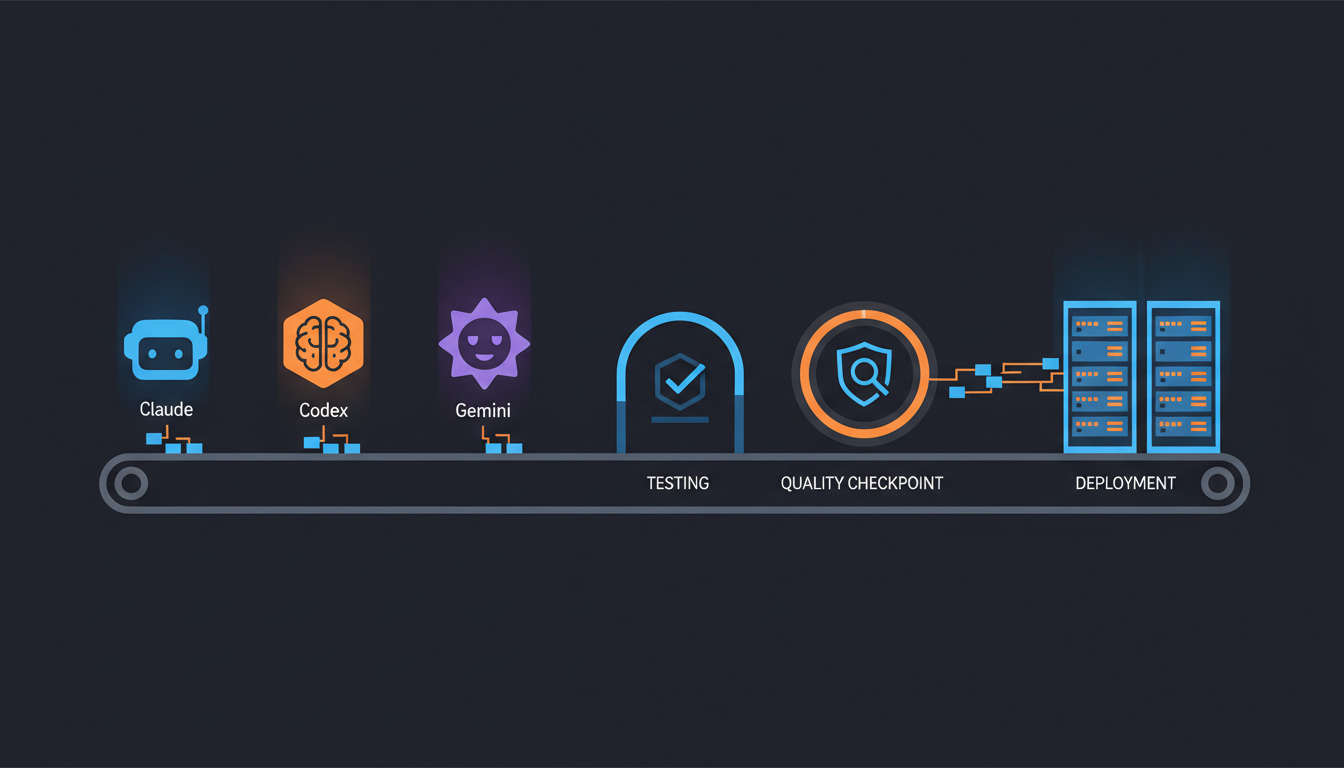
There's another way: run the same AI coding CLIs you use locally — Claude Code, Codex CLI, and Gemini CLI — as headless steps in your CI/CD pipeline. You control the prompt, the model, the tools, and the cost. The agent runs non-interactively, produces output, and the pipeline decides what to do with it.
This is the bring your own agent
approach. It works on any CI platform that can run a shell command.
Headless Mode for Each CLI
Each tool has a way to run without interactive input — no terminal UI, no approval prompts, just input and output.
Claude Code
# Print mode — runs a single prompt, outputs result, exits
claude -p "Analyze the git diff and generate a changelog entry" \
  --allowedTools Edit,Write,Bash \
  --output-format json

# With stdin piping
git diff HEAD~1 | claude -p "Generate a changelog entry for these changes" \
  --output-format text

# With max tokens to control cost
claude -p "Fix the failing test in tests/auth.test.ts" \
  --allowedTools Edit,Read,Bash \
  --max-turns 10
Key flags: -p (print mode, non-interactive), --allowedTools (restrict what the agent can do), --output-format (json or text), --max-turns (limit iterations).
Codex CLI
# Full auto mode — no human approval needed
codex --approval-mode full-auto \
  --quiet \
  "Update the README with the latest API changes"

# With file restrictions
codex --approval-mode full-auto \
  --quiet \
  --full-auto-error-mode ask-user \
  "Add input validation to the user registration endpoint"
Key flags: --approval-mode full-auto (no interactive prompts), --quiet (minimal output).
Gemini CLI
# Non-interactive with prompt
echo "Generate unit tests for src/utils/validator.ts" | gemini

# With sandbox mode
gemini -s "Review the last commit for security issues" \
  --sandbox
Practical Use Cases with Full CI Config
1. Auto-Generate Changelog from Git Diff
The agent reads the diff since the last release tag and writes a human-readable changelog entry:
name: Generate Changelog

on:
  push:
    tags: ['v*']

jobs:
  changelog:
    runs-on: ubuntu-latest
    steps:
      - uses: actions/checkout@v4
        with:
          fetch-depth: 0

      - name: Install Claude Code
        run: npm install -g @anthropic-ai/claude-code

      - name: Generate changelog entry
        env:
          ANTHROPIC_API_KEY: ${{ secrets.ANTHROPIC_API_KEY }}
        run: |
          PREV_TAG=$(git describe --tags --abbrev=0 HEAD~1 2>/dev/null || echo "")
          DIFF=$(git log ${PREV_TAG}..HEAD --oneline --no-merges)

          echo "$DIFF" | claude -p "Generate a changelog entry in Keep a Changelog format. Group changes into Added, Changed, Fixed, Removed. Be concise — one line per change. Output only the changelog markdown, nothing else." \
            --output-format text > CHANGELOG_ENTRY.md

      - name: Create release with changelog
        env:
          GH_TOKEN: ${{ secrets.GITHUB_TOKEN }}
        run: |
          gh release create ${{ github.ref_name }} \
            --title "${{ github.ref_name }}" \
            --notes-file CHANGELOG_ENTRY.md
2. AI-Powered Code Review on Changed Files
Run the agent as a review step on every PR — it reads the diff and leaves comments:
name: AI Code Review

on:
  pull_request:
    types: [opened, synchronize]

jobs:
  ai-review:
    runs-on: ubuntu-latest
    permissions:
      pull-requests: write
      contents: read
    steps:
      - uses: actions/checkout@v4

      - name: Install Claude Code
        run: npm install -g @anthropic-ai/claude-code

      - name: Run AI review
        env:
          ANTHROPIC_API_KEY: ${{ secrets.ANTHROPIC_API_KEY }}
        run: |
          DIFF=$(gh pr diff ${{ github.event.pull_request.number }})

          REVIEW=$(echo "$DIFF" | claude -p "Review this diff for:
          1. Security issues (SQL injection, XSS, hardcoded secrets)
          2. Missing error handling
          3. Performance concerns (N+1 queries, unnecessary loops)
          4. Missing input validation

          Format as a markdown list. If no issues found, say 'No issues found.' Be specific — reference file names and line numbers." \
            --output-format text \
            --max-turns 3)

          gh pr comment ${{ github.event.pull_request.number }} \
            --body "## AI Code Review

          $REVIEW

          ---
          *Automated review by Claude Code. This is advisory — human review is still required.*"
Once an agent produces a change that passes review, the last mile is shipping it. Wire your CI into an automated build pipeline and a green run deploys to your own server automatically — the agent writes, CI validates, and the release goes out with no manual step in between.
3. Auto-Fix CI Failures
When tests fail, the agent reads the error output and proposes a fix:
name: Tests with Auto-Fix

on:
  pull_request:

jobs:
  test:
    runs-on: ubuntu-latest
    steps:
      - uses: actions/checkout@v4
        with:
          ref: ${{ github.head_ref }}

      - uses: actions/setup-node@v4
        with:
          node-version: 20

      - run: npm ci
      - name: Run tests
        id: tests
        continue-on-error: true
        run: npm test 2>&1 | tee test-output.txt

      - name: AI fix attempt
        if: steps.tests.outcome == 'failure'
        env:
          ANTHROPIC_API_KEY: ${{ secrets.ANTHROPIC_API_KEY }}
        run: |
          npm install -g @anthropic-ai/claude-code

          claude -p "The tests failed. Here's the output:

          $(cat test-output.txt)

          Read the failing test files and the source code they test.
          Fix the source code to make the tests pass.
          Do NOT modify the test files — fix the implementation." \
            --allowedTools Read,Edit,Bash \
            --max-turns 15

      - name: Verify fix
        if: steps.tests.outcome == 'failure'
        run: npm test

      - name: Commit fix
        if: steps.tests.outcome == 'failure'
        run: |
          git config user.name "AI Agent"
          git config user.email "ai-agent@deployhq.com"
          git add -A
          git diff --staged --quiet || git commit -m "fix: auto-fix failing tests (AI-generated)"
          git push
4. Security Scanning with AI Triage
Run a SAST tool, then have the AI prioritize and explain findings:
name: Security Scan + AI Triage

on:
  pull_request:

jobs:
  security:
    runs-on: ubuntu-latest
    steps:
      - uses: actions/checkout@v4

      - name: Run Semgrep
        run: |
          pip install semgrep
          semgrep --config auto --json --output semgrep-results.json . || true

      - name: AI triage
        env:
          ANTHROPIC_API_KEY: ${{ secrets.ANTHROPIC_API_KEY }}
        run: |
          npm install -g @anthropic-ai/claude-code

          TRIAGE=$(claude -p "Here are Semgrep security scan results:

          $(cat semgrep-results.json)

          Triage these findings:
          1. Remove false positives (explain why)
          2. Rank remaining issues by severity (Critical, High, Medium, Low)
          3. For each real issue, explain the attack vector in one sentence
          4. Suggest a fix for Critical and High issues

          Format as a markdown table." \
            --output-format text \
            --max-turns 3)

          echo "$TRIAGE" >> $GITHUB_STEP_SUMMARY
5. Generate Tests for Modified Code
When a PR changes source files, the agent generates missing tests:
name: Auto-Generate Tests

on:
  pull_request:

jobs:
  generate-tests:
    runs-on: ubuntu-latest
    steps:
      - uses: actions/checkout@v4
        with:
          ref: ${{ github.head_ref }}

      - uses: actions/setup-node@v4
        with:
          node-version: 20

      - run: npm ci

      - name: Install Claude Code
        run: npm install -g @anthropic-ai/claude-code

      - name: Generate tests for changed files
        env:
          ANTHROPIC_API_KEY: ${{ secrets.ANTHROPIC_API_KEY }}
        run: |
          CHANGED=$(gh pr diff ${{ github.event.pull_request.number }} --name-only | grep -E '\.(ts|js)$' | grep -v test | grep -v spec)

          for FILE in $CHANGED; do
            TEST_FILE=$(echo "$FILE" | sed 's/\.ts$/.test.ts/' | sed 's|src/|tests/unit/|')

            if [ ! -f "$TEST_FILE" ]; then
              claude -p "Read $FILE and generate a comprehensive unit test file.
              Use Vitest. Follow the existing test patterns in the project.
              Save the test file to $TEST_FILE.
              Test all exported functions including edge cases." \
                --allowedTools Read,Write \
                --max-turns 10
            fi
          done

      - name: Verify tests pass
        run: npm test

      - name: Commit generated tests
        run: |
          git config user.name "AI Agent"
          git config user.email "ai-agent@deployhq.com"
          git add tests/
          git diff --staged --quiet || git commit -m "test: add AI-generated tests for new code"
          git push
Other CI Platforms
The same patterns work on any CI platform:
GitLab CI:
ai-review:
  stage: review
  image: node:20
  script:
    - npm install -g @anthropic-ai/claude-code
    - git diff origin/main...HEAD | claude -p "Review this diff for bugs and security issues" --output-format text > review.md
    - cat review.md
  artifacts:
    reports:
      dotenv: review.md
  variables:
    ANTHROPIC_API_KEY: $ANTHROPIC_API_KEY
Bitbucket Pipelines:
pipelines:
  pull-requests:
    '**':
      - step:
          name: AI Code Review
          image: node:20
          script:
            - npm install -g @anthropic-ai/claude-code
            - git diff origin/main...HEAD | claude -p "Review for security issues" --output-format text
Connecting to Deployment
After the agent's changes pass CI, you can trigger a deployment automatically using the DeployHQ CLI:
- name: Deploy to Staging
  if: success()
  run: |
    curl -fsSL https://www.deployhq.com/install-cli.sh | bash
    dhq auth login --token "${{ secrets.DEPLOYHQ_API_KEY }}"
    dhq deploy --server staging --wait --json
This completes the loop: agent writes code → CI validates → agent fixes failures → the deployment pipeline ships it. The full pattern is covered in our companion post on connecting agentic CI/CD to DeployHQ.
Cost Management
Running AI agents in CI can get expensive fast. Here's how to keep costs under control:
| Strategy | How | Savings |
|---|---|---|
| Limit turns | --max-turns 10 |
Prevents infinite loops |
| Restrict tools | --allowedTools Read,Edit |
Fewer API calls per turn |
| Filter triggers | Only run on src/ changes |
Skip docs-only PRs |
| Use cheaper models | Claude Haiku for simple tasks | 10x cheaper than Opus |
| Cache results | Skip review if diff unchanged | Eliminates duplicate runs |
| Set timeouts | timeout-minutes: 10 |
Hard stop on runaway agents |
A typical AI review step costs $0.02-0.10 per PR with Claude Sonnet. Auto-fix attempts cost more ($0.20-1.00) because the agent reads files and makes multiple edits. Budget accordingly — for most teams, this is cheaper than the developer time it saves.
Security Considerations
Running an AI agent in CI means giving it access to your code and (potentially) your secrets. Lock it down:
- Scope secrets tightly. The agent needs an API key for its model provider. It does NOT need your database credentials, deployment tokens, or SSH keys. Use GitHub's environment-level secrets to control access.
- Restrict file access. Use
--allowedToolsto prevent the agent from running arbitrary shell commands.Read,Editis sufficient for most review tasks. - Validate output. Don't blindly commit agent-generated changes. Run your full test suite after any agent modification.
- Audit agent commits. Tag agent-generated commits with a machine author (
ai-agent@yourcompany.com) so they're easy to identify in git history. - Don't run agents on forks. Disable AI review steps on PRs from forked repositories — the fork author could craft a prompt injection in the diff.
When to Use What
| Approach | Best For | Trade-offs |
|---|---|---|
| Platform agent (Copilot) | Issue-to-PR automation, managed infrastructure | Less control, GitHub-only, opaque |
| Headless CLI (Claude/Codex/Gemini) | Custom review, fix, and generation workflows | More setup, you manage costs, any CI platform |
| Dedicated review tool (CodeRabbit) | PR review specifically | Best review UX, less flexible for other tasks |
| No agent | Simple projects, strict security requirements | Maximum control, minimum risk |
Most teams end up combining approaches: a dedicated review tool (CodeRabbit or Copilot) for every PR, plus headless CLI agents for specific workflows like changelog generation or test scaffolding.
Running your own AI agent in CI gives you control that platform-managed agents can't match. You choose the model, the prompt, the tools, and the budget. The trade-off is setup and maintenance — but once the workflow YAML is written, it runs on every PR without intervention.
Start with one workflow — changelog generation or AI code review — and expand from there. Keep costs visible, scope permissions tightly, and always run tests after agent modifications.
Ready to connect your AI-powered CI pipeline to deployment? DeployHQ deploys to any server you own with zero-downtime deployments, one-click rollback, and a CLI built for CI/CD automation. Get started for free.
For questions or feedback, reach out at support@deployhq.com or on Twitter/X.