

Global Environment Variables
Global environment variables are account-level variables that are automatically inherited by all projects in your DeployHQ account. They are ideal for shared secrets, API keys, or configuration values that multiple projects need access to.
Creating a global environment variable
To create a global environment variable, go to your DeployHQ account settings by clicking on "Settings" in the top bar, then click on "Global Environment Variables" in the left column. Click "New Environment Variable" to begin.
Configure the variable with the following fields:
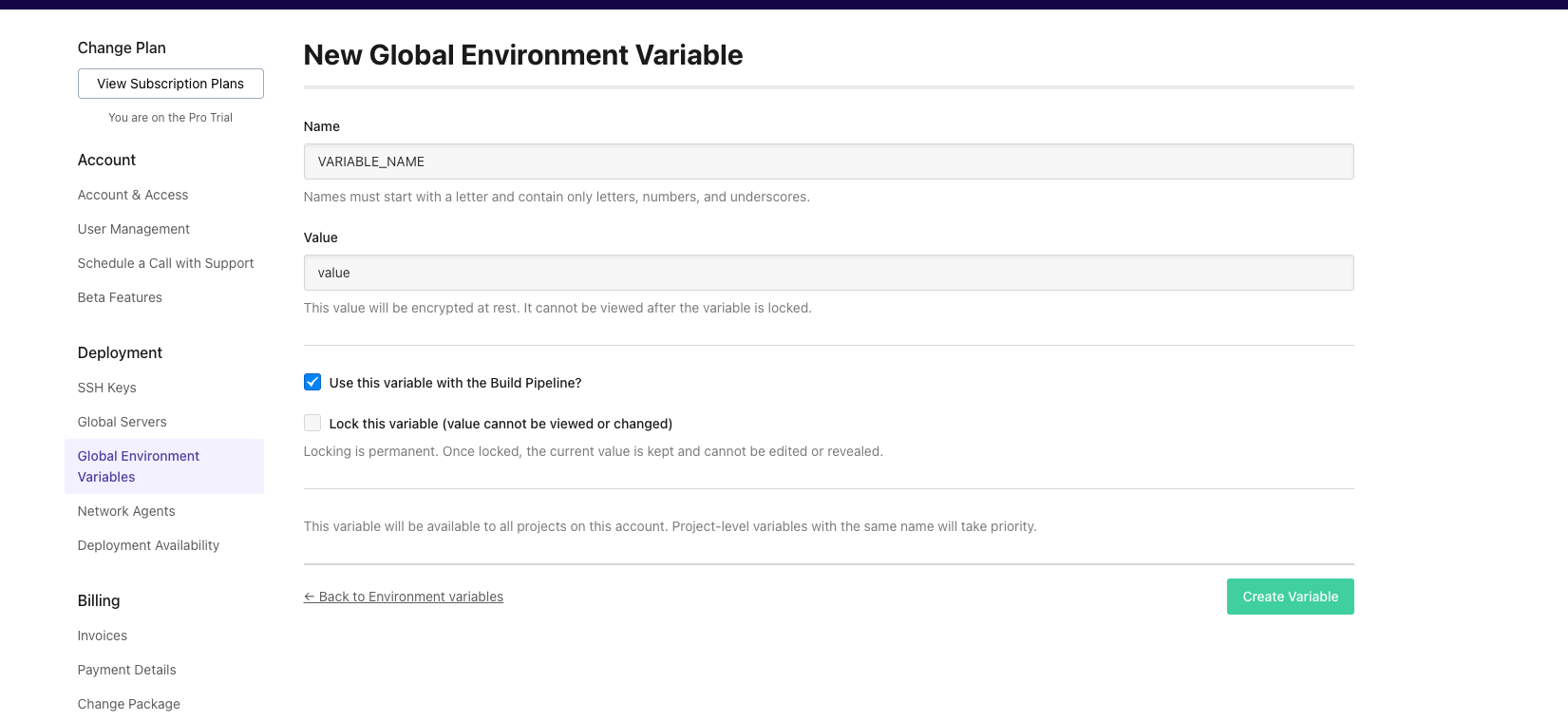
- Name -- The variable name. Must start with a letter and contain only letters, numbers, and underscores (e.g.
API_KEY,DATABASE_HOST). - Value -- The variable value. This is encrypted at rest and masked in the UI for security.
- Locked -- When enabled, the variable name and value cannot be changed or unlocked after saving. Use this for sensitive credentials that should not be modified.
- Build pipeline -- When enabled, the variable is available during the build pipeline step of deployments.
How precedence works
Global environment variables have the lowest precedence in the variable hierarchy. When the same variable name is defined at multiple levels, the more specific definition takes priority:
- Account-level (lowest precedence) -- Global environment variables apply to all projects.
- Project-level -- A project-level variable with the same name overrides the account-level value for that project.
- Server-specific (highest precedence) -- A variable scoped to a specific server or server group overrides both project-level and account-level values.
This means you can set a default value at the account level and override it for specific projects or servers as needed.
Locking variables
Locking a variable prevents its name and value from being changed after it is saved. Once a variable is locked, it cannot be unlocked. This is useful for protecting sensitive credentials from accidental modification.
Locked variables display a lock icon in the variable list. Their values remain masked in the UI and cannot be revealed, even by account administrators.
Security
All environment variable values are encrypted at rest in the database. Values are masked in the UI by default. Account administrators can view the actual values of unlocked variables, but locked variable values are always masked.
Managing global environment variables via API
You can also manage global environment variables programmatically through the DeployHQ API:
- List all global environment variables
- Create a global environment variable
- Update a global environment variable
- Delete a global environment variable
See The DeployHQ API for authentication and general usage.